Send lead emails to a CRM webhook
Use this recipe when lead emails from forms, marketplaces, partners, or shared inboxes should become CRM records through your own webhook receiver.
MailWebhook receives the email, matches a lead route, extracts stable fields with Custom JSON, and posts a CRM-shaped JSON body to your endpoint. Your receiver can verify the signature, deduplicate the request, enrich the lead, and call the CRM API.
Building the receiving service? See Email Webhook API. If your team wants this lead-entry workflow operated instead of maintaining the receiver and field mapping, see Email data entry automation.
Table of contents
- Short answer
- When to use this
- Prerequisites
- Example lead email
- 1. Connect the lead mailbox
- 2. Create the CRM endpoint
- 3. Create the lead route rule
- 4. Add the CRM lead mapper
- Full route JSON example
- Endpoint behavior
- Verify the result
- Common failure checks
- Related docs
Short answer
Create a MailWebhook endpoint for your CRM intake service, then create a route for lead emails. Use map.custom_json with call.extract.key_value_pairs when the email body contains labels such as Full Name, Email, Company, and Phone.
Example CRM lead payload:
{
  "type": "crm.lead.create",
  "external_id": "6ff49aa1-7050-4ad1-95d9-2711f2ca7e88",
  "source": "email",
  "lead": {
    "name": "Ada Lovelace",
    "email": "ada@example.com",
    "company": "Example Co",
    "phone": "+1 555 0100",
    "message": "I would like a product demo"
  }
}
MailWebhook sends that JSON body exactly as the endpoint request body. Delivery headers include X-MailWebhook-Signature and X-Idempotency-Key.
When to use this
Use this recipe for:
- Website contact form emails that should create CRM leads.
- Demo request emails from marketing automation tools.
- Marketplace inquiry emails.
- Partner referral emails.
- Shared sales inboxes that receive structured lead notifications.
Use map.custom_json when your CRM receiver expects a specific body shape. Use map.generic_json when the receiver wants the full normalized email object and will transform fields after receipt.
Prerequisites
You need:
- A MailWebhook account and project.
- A mailbox source that receives the lead emails.
- A public HTTP or HTTPS endpoint that accepts JSON
POSTrequests. - A receiver that can create or enqueue a CRM lead before returning
2xx. - A MailWebhook signing secret if your receiver verifies signed delivery.
MailWebhook endpoint URLs must resolve to public addresses. Private, loopback, link-local, reserved, and multicast targets are blocked.
Example lead email
This recipe assumes lead emails contain stable labels like this:
Full Name: Ada Lovelace
Email: ada@example.com
Company: Example Co
Phone: +1 555 0100
Lead Source: Website demo form
Message: I would like a product demo
The call.extract.key_value_pairs helper normalizes these labels into lookup keys:
| Email label | Normalized key | Custom JSON path |
|---|---|---|
Full Name | full_name | vars.kv.values.full_name |
Email | email | vars.kv.values.email |
Company | company | vars.kv.values.company |
Phone | phone | vars.kv.values.phone |
Lead Source | lead_source | vars.kv.values.lead_source |
Message | message | vars.kv.values.message |
Use provider-real test emails before relying on a mapper. Form tools can change labels, whitespace, subject lines, and sender addresses.
1. Connect the lead mailbox
Connect the mailbox that receives lead notifications.
Common choices:
- Gmail mailbox for a sales or marketing address.
- Microsoft 365, Office 365, or Outlook mailbox for a shared sales inbox.
- IMAP mailbox for an existing intake inbox.
- Hosted Mailbox when MailWebhook should provide the intake address.
- Loopback mailbox for first-pass testing.
Copy the exact recipient address that should trigger the CRM route.
2. Create the CRM endpoint
Open Endpoints and create an endpoint for your CRM intake receiver.
Example:
| Field | Value |
|---|---|
| Webhook URL | https://crm-intake.example.com/mailwebhook/leads |
| Custom header | Authorization: Bearer crm-intake-token |
| Timeout | Keep the default unless your receiver needs a different project standard. |
Your receiver should:
- Read the raw request body before parsing JSON if it verifies
X-MailWebhook-Signature. - Use
X-Idempotency-Keyorexternal_idto avoid duplicate leads during retries and replay. - Store or enqueue the lead before returning
2xx. - Call the CRM API after the request has been accepted, or enqueue that work.
If the CRM API requires OAuth, account lookup, owner assignment, or deduplication rules, put a small receiver in front of the CRM rather than posting directly to the CRM from MailWebhook.
3. Create the lead route rule
Open Routes and create a route for the CRM endpoint.
For a dedicated lead inbox, start with the recipient rule:
{
  "to_emails": ["leads@example.com"]
}
For a shared sales inbox, narrow the rule:
{
  "to_emails": ["sales@example.com"],
  "subject_contains": ["new lead", "demo request", "contact form"],
  "none": [
    {
      "from_domains": ["internal.example"]
    }
  ]
}
Top-level rule fields are AND-ed. In the second example, the message must go to sales@example.com, include one of the subject terms, and avoid the internal sender domain.
4. Add the CRM lead mapper
Use map.custom_json as the final pipeline step.
{
  "steps": [
    {
      "name": "map.custom_json",
      "args": {
        "version": "v1",
        "vars": [
          {
            "name": "kv",
            "expr": {
              "call.extract.key_value_pairs": {
                "mode": "auto",
                "html": { "var": "message.html" },
                "text": { "var": "message.text" }
              }
            }
          },
          {
            "name": "body_text",
            "expr": {
              "call.transform.html_to_text": {
                "html": { "var": "message.html" },
                "text": { "var": "message.text" }
              }
            }
          }
        ],
        "output": {
          "type": "crm.lead.create",
          "external_id": { "var": "ctx.event_id" },
          "source": "email",
          "mailwebhook": {
            "event_id": { "var": "ctx.event_id" },
            "route_id": { "var": "ctx.route_id" },
            "source_type": { "var": "ctx.source_type" },
            "message_id": { "var": "message.message_id" }
          },
          "lead": {
            "name": { "var": "vars.kv.values.full_name" },
            "email": { "var": "vars.kv.values.email" },
            "company": { "var": "vars.kv.values.company" },
            "phone": { "var": "vars.kv.values.phone" },
            "lead_source": { "var": "vars.kv.values.lead_source" },
            "message": { "var": "vars.kv.values.message" }
          },
          "email": {
            "from": { "var": "message.from[0].email" },
            "subject": { "var": "message.subject" },
            "body": { "var": "vars.body_text" }
          },
          "raw_fields": { "var": "vars.kv.items" },
          "attachments": { "var": "message.attachments" }
        }
      }
    }
  ]
}
This mapper keeps the CRM body focused while preserving the MailWebhook event id, route id, source type, message id, original sender, subject, normalized extracted fields, ordered extracted fields, body text, and attachment metadata.
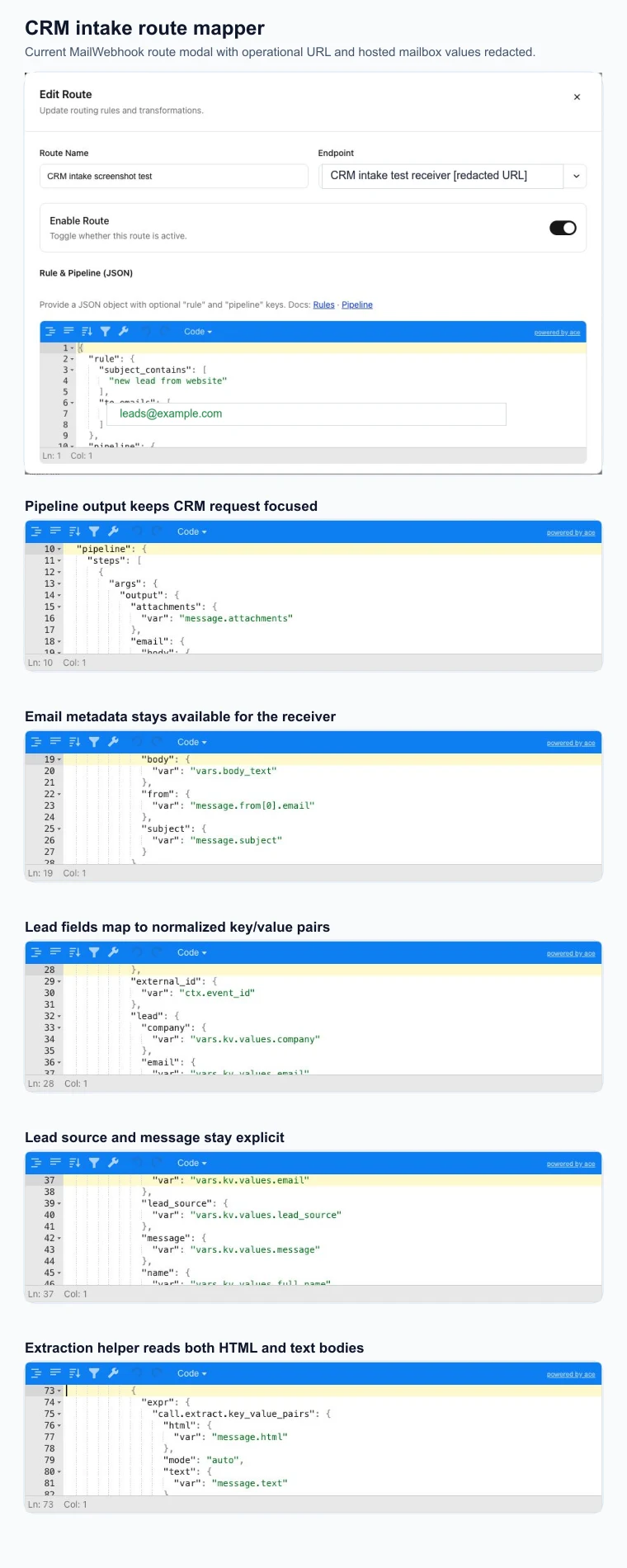
Full route JSON example
{
  "name": "Lead emails to CRM intake",
  "endpoint_id": "0f5a83e4-8220-4f0d-917e-6be20d9dc32d",
  "signing_secret_kid": "route-signing-prod",
  "enabled": true,
  "rule": {
    "to_emails": ["leads@example.com"],
    "subject_contains": ["new lead", "demo request", "contact form"]
  },
  "pipeline": {
    "steps": [
      {
        "name": "map.custom_json",
        "args": {
          "version": "v1",
          "vars": [
            {
              "name": "kv",
              "expr": {
                "call.extract.key_value_pairs": {
                  "mode": "auto",
                  "html": { "var": "message.html" },
                  "text": { "var": "message.text" }
                }
              }
            },
            {
              "name": "body_text",
              "expr": {
                "call.transform.html_to_text": {
                  "html": { "var": "message.html" },
                  "text": { "var": "message.text" }
                }
              }
            }
          ],
          "output": {
            "type": "crm.lead.create",
            "external_id": { "var": "ctx.event_id" },
            "source": "email",
            "mailwebhook": {
              "event_id": { "var": "ctx.event_id" },
              "route_id": { "var": "ctx.route_id" },
              "source_type": { "var": "ctx.source_type" },
              "message_id": { "var": "message.message_id" }
            },
            "lead": {
              "name": { "var": "vars.kv.values.full_name" },
              "email": { "var": "vars.kv.values.email" },
              "company": { "var": "vars.kv.values.company" },
              "phone": { "var": "vars.kv.values.phone" },
              "lead_source": { "var": "vars.kv.values.lead_source" },
              "message": { "var": "vars.kv.values.message" }
            },
            "email": {
              "from": { "var": "message.from[0].email" },
              "subject": { "var": "message.subject" },
              "body": { "var": "vars.body_text" }
            },
            "raw_fields": { "var": "vars.kv.items" },
            "attachments": { "var": "message.attachments" }
          }
        }
      }
    ]
  }
}
Endpoint behavior
MailWebhook delivers the route pipeline output as a JSON POST request.
For the Custom JSON mapper above, the body has this shape:
{
  "type": "crm.lead.create",
  "external_id": "6ff49aa1-7050-4ad1-95d9-2711f2ca7e88",
  "source": "email",
  "mailwebhook": {
    "event_id": "6ff49aa1-7050-4ad1-95d9-2711f2ca7e88",
    "route_id": "2f3713bf-88cc-46c6-aaa3-ea9d6e9d20f3",
    "source_type": "hosted",
    "message_id": "<lead-4482@example.com>"
  },
  "lead": {
    "name": "Ada Lovelace",
    "email": "ada@example.com",
    "company": "Example Co",
    "phone": "+1 555 0100",
    "lead_source": "Website demo form",
    "message": "I would like a product demo"
  },
  "email": {
    "from": "forms@example.com",
    "subject": "New lead from website",
    "body": "Full Name: Ada Lovelace\nEmail: ada@example.com\nCompany: Example Co\nPhone: +1 555 0100\nLead Source: Website demo form\nMessage: I would like a product demo"
  },
  "raw_fields": [
    {
      "key": "Full Name",
      "normalized_key": "full_name",
      "value": "Ada Lovelace",
      "separator": ":",
      "source": "text",
      "line": 1
    }
  ],
  "attachments": []
}
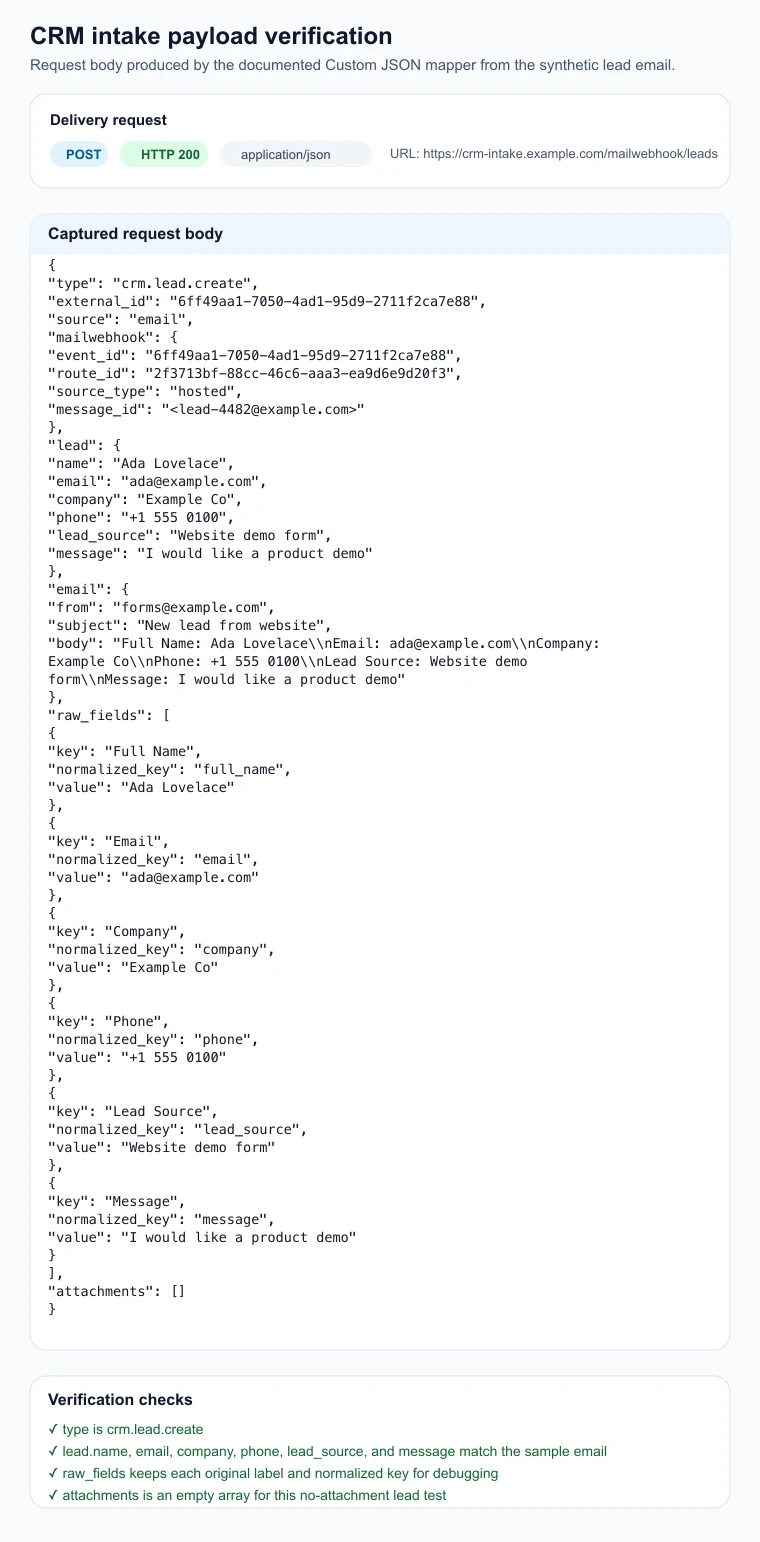
MailWebhook also sends:
X-MailWebhook-SignatureX-Idempotency-KeyContent-Type: application/json- Any custom endpoint headers you configured
Attachments are metadata only in this request body. If lead emails include files, fetch file bytes through the MailWebhook attachment download API after your receiver decides it needs them.
Verify the result
A working CRM lead route has these signs:
- A MailWebhook event exists for the test email.
- The event matched the CRM lead route.
- The request body contains
type,external_id,lead,email, andraw_fields. - The delivery attempt returned
2xx. - Your receiver accepted or durably enqueued the lead before returning
2xx. - Replay of the same event uses the same idempotency key so your receiver can avoid duplicates.
Use Webhook Preview or Events to compare the delivered request body with your receiver logs or intake queue. If your receiver writes to a CRM, compare the queued lead with the CRM record after that integration is tested.
Common failure checks
No MailWebhook event exists
The mailbox did not ingest the message, or the lead email went to a different address.
Check the mailbox setup first:
- Gmail labels and OAuth status.
- Microsoft mailbox connection.
- IMAP host, folder, and polling.
- Hosted mailbox address.
- Loopback alias status for onboarding tests.
An event exists, but the route did not match
Inspect the route rule against the real message.
Common causes:
to_emailsdoes not match the final recipient after forwarding.subject_containsexcludes a valid lead email.noneblocks a sender that should be allowed.- The route is disabled.
The route will not save
Check the pipeline contract:
- Exactly one
map.*step must exist. - The
map.*step must be final. map.custom_jsonrequiresversion: "v1".map.custom_jsonrequires anoutputobject or value.- Custom JSON paths must use roots such as
message,ctx,meta, andvars.
CRM fields are null
Missing Custom JSON paths evaluate to null.
Common causes:
- The form email changed labels, such as
Nameinstead ofFull Name. - The email uses punctuation that the key/value helper does not accept as a key.
- The email body is prose rather than key/value text.
- The route test message is not the same shape as provider-real lead emails.
Keep raw_fields in early versions of the mapper so you can see which normalized keys the extractor produced.
The CRM creates duplicate leads
Use X-Idempotency-Key as the primary duplicate guard. You can also store external_id.
MailWebhook may retry retryable failures and can replay an event after you request replay. Your receiver should treat the same idempotency key as the same lead creation attempt.
The CRM rejects the payload
Compare the captured request body with the CRM receiver contract.
Common fixes:
- Map required CRM fields explicitly.
- Normalize phone numbers and owner assignment in your receiver.
- Convert
nullfields to omitted fields if your CRM rejectsnull. - Return
2xxonly after the receiver has stored or enqueued the lead.
Attachments are missing from the CRM record
Custom JSON can include message.attachments metadata. It does not inline file bytes.
To attach files to a lead:
- Read the attachment metadata from the webhook body.
- Call the attachment download URL API with your MailWebhook API key.
- Upload the downloaded file to your CRM.
- Store the attachment id and filename on the CRM record for traceability.
Signature verification fails
Verify X-MailWebhook-Signature against the exact raw request body bytes.
Do not verify against parsed JSON, pretty-printed JSON, decoded text, or a reserialized copy of the body.
Related docs
- Connect Gmail as a mailbox source
- Microsoft 365 mailbox setup
- IMAP mailbox configuration
- Create a hosted mailbox
- Test routes with a loopback mailbox
- Rules
- Pipeline
- Custom JSON
- JsonLogic-Style DSL
- Endpoints
- Webhook payload reference
- Verify signed webhook deliveries
- Fetch email attachments from webhook payloads
- API keys and attachment downloads
- Troubleshoot route rules that do not match
- Troubleshoot Custom JSON mapper errors
- Troubleshoot failed webhook deliveries
- Webhook retries and replay